

MIDI & MusicXML Player
More than a MIDI player: an advanced MusicXML viewer and reader
Open MIDI and MusicXML files online, follow the sheet music during playback, and practice with tempo, transposition, note names, fingerings, and more.
Free, no sign-up
Premium optional (7-day trial)
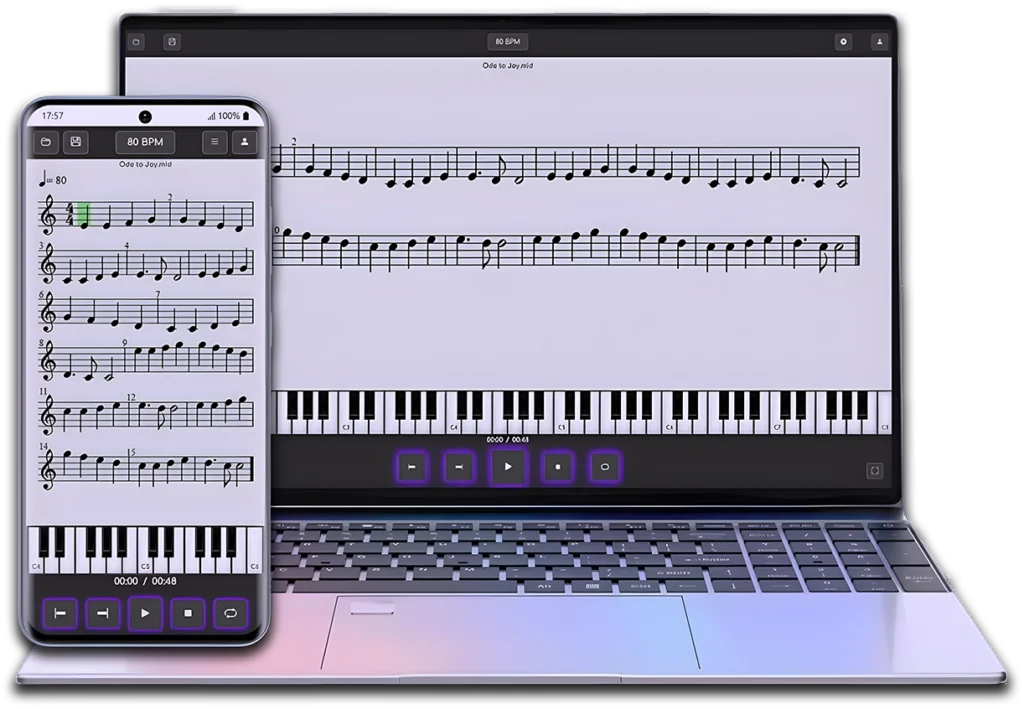
Try it in 10 seconds
View an example of the sheet music in sync with MIDI playback
Then, open it in the full Player to explore all features
How it works

Step 1

Step 2

Step 3
Everything you can do with this MIDI and MusicXML player online

Upload your own MIDI, MID, or MusicXML files
Or choose from 5,000+ songs and exercises

Create a private library or share your files with the community

Choose from 100+ SoundFonts

Change the key, clef, or transposition

Save your progress with Study Mode

Practice with the virtual piano

Learn notes with names and colors

Add recorder fingerings, trumpet fingerings, or trombone slide positions
Who this MIDI and MusicXML player is for

Musicians

Students

Teachers
Content & Rights
Your Private files are visible only to you. Public scores must respect copyright: upload only works you own or have permission/license to share. Upon valid notices, any infringing content will be removed.
Use it as a web MIDI player or on Android
Open MIDI and MusicXML files in your browser on PC, Mac, or mobile devices, or use the Android app for the same interactive playback experience


Scan it to install on Android
Your plan, at your pace
Choose the right plan for your MIDI and MusicXML playback needs
Monthly
Yearly
(Save 40%)
Guest
Ideal if you are simply lookingtest the app
-
Web and smartphone
-
Multilingual (EN, ES, FR, BR, DE, KO)
-
Help and support
-
Video tutorials
-
MIDI (midi/mid)
-
MusicXML (musicxml/mxl,xml)
-
Clave de Mi exercises
-
Community-shared exercises
-
Daily sheet music
-
*View music sheet (5-10 x day)
-
Automatic Soundfont
-
Save scores
-
Virtual Piano
-
Tempo modification (BMP)
-
Metronome
-
Notes name
-
Brass fingering
-
Recorder fingering
-
Music Theory Mode
-
Color-coded notes
-
Loop playback
-
Instrument transposition
-
Interval playback
-
Introduction measure
-
Clef change
-
Sheet transposition
-
Study mode
-
Export scores
-
With Ads
Free
Ideal for adapting sheet musicto basic studio needs
-
Web and smartphone
-
Multilingual (EN, ES, FR, BR, DE, KO)
-
Help and support
-
Video tutorials
-
MIDI (midi/mid)
-
MusicXML (musicxml/mxl,xml)
-
Clave de Mi exercises
-
Community-shared exercises
-
Daily sheet music
-
*View music sheet (5-10 x day)
-
Automatic Soundfont
-
** Save scores
-
Virtual Piano
-
Tempo modification (BPM)
-
Metronome
-
Notes name
-
Brass fingering
-
Recorder fingering
-
Music Theory Mode
-
Color-coded notes
-
Loop playback
-
Instrument transposition
-
Interval Playback
-
Introduction measure
-
Clef change
-
Sheet transposition
-
Study mode
-
Export scores
-
With Ads
Premium
Same features as the Full planbut in an economical version.
-
Web and smartphone
-
Multilingual (EN, ES, FR, BR, DE, KO)
-
Help and support
-
Video tutorials
-
MIDI (midi/mid)
-
MusicXML (musicxml/mxl,xml)
-
Clave de Mi exercises
-
Community-shared exercises
-
Daily sheet music
-
View music sheet
-
+100 Soundfonts
-
Save scores
-
Virtual Piano
-
Tempo modification (BPM)
-
Metronome
-
Notes name
-
Brass fingering
-
Recorder fingering
-
Music Theory Mode
-
Color-coded notes
-
Loop playback
-
Instrument transposition
-
Interval Playback
-
Introduction measure
-
Clef change
-
Sheet transposition
-
Study mode
-
Export scores
-
Ad-free
Guest
Ideal if you are simply lookingtest the app
-
Web and smartphone
-
Multilingual (EN, ES, FR, BR, DE, KO)
-
Help and support
-
Video tutorials
-
MIDI (midi/mid)
-
MusicXML (musicxml/mxl,xml)
-
Clave de Mi exercises
-
Community-shared exercises
-
Daily sheet music
-
*View music sheet (5-10 x day)
-
Automatic Soundfont
-
Save scores
-
Virtual Piano
-
Tempo modification (BMP)
-
Metronome
-
Notes name
-
Brass fingering
-
Recorder fingering
-
Music Theory Mode
-
Color-coded notes
-
Loop playback
-
Instrument transposition
-
Interval playback
-
Introduction measure
-
Clef change
-
Sheet transposition
-
Study mode
-
Export scores
-
With Ads
Free
Ideal for adapting sheet musicto basic studio needs
-
Web and smartphone
-
Multilingual (EN, ES, FR, BR, DE, KO)
-
Help and support
-
Video tutorials
-
MIDI (midi/mid)
-
MusicXML (musicxml/mxl,xml)
-
Clave de Mi exercises
-
Community-shared exercises
-
Daily sheet music
-
*View music sheet (5-10 x day)
-
Automatic Soundfont
-
** Save scores
-
Virtual Piano
-
Tempo modification (BPM)
-
Metronome
-
Notes name
-
Brass fingering
-
Recorder fingering
-
Music Theory Mode
-
Color-coded notes
-
Loop playback
-
Instrument transposition
-
Interval Playback
-
Introduction measure
-
Clef change
-
Sheet transposition
-
Study mode
-
Export scores
-
With Ads
Premium
If you want to have complete controlof the scores and save your progress.
-
Web and smartphone
-
Multilingual (EN, ES, FR, BR, DE, KO)
-
Help and support
-
Video tutorials
-
MIDI (midi/mid)
-
MusicXML (musicxml/mxl,xml)
-
Clave de Mi exercises
-
Community-shared exercises
-
Daily sheet music
-
View music sheet
-
+100 Soundfonts
-
Save scores
-
Virtual Piano
-
Tempo modification (BPM)
-
Metronome
-
Notes name
-
Brass fingering
-
Recorder fingering
-
Music Theory Mode
-
Color-coded notes
-
Loop playback
-
Instrument transposition
-
Interval Playback
-
Introduction measure
-
Clef change
-
Sheet transposition
-
Study mode
-
Export scores
-
Ad-free
* 5 scores per day. Up to 10 by watching ads.
** Scores visible to the entire community.
FAQ (Frequently Asked Questions)
Can I use this MIDI and MusicXML player for free?
Yes. You can use the player right away without signing up, both on the web version and on the Android APP.
Creating a free account unlocks more features, and a Premium Plan gives you full access to all features.
How do I get started?
It´s easy: open the Player, upload a MIDI, MID, or MusicXML file or choose one from the catalogue, and start exploring playback, sheet music, and practice tools.
Can I use this as an online MIDI file player for songs and exercises?
Yes. You can upload your own MIDI or MID files, or choose from thousands of songs and exercises in the catalogue, and follow the sheet music during playback.
What is the difference between a MIDI player and a MusicXML viewer?
A MIDI player plays MIDI files and can show playback information, while a MusicXML viewer displays written sheet music in a more complete way. MIDI & MusicXML Player combines both, so you can open files, follow the sheet music, and practice more easily.
Can I follow the sheet music during MIDI playback?
Yes. The player lets you follow the sheet music in sync with MIDI playback, which makes practice, study, and score reading easier.
Which file formats does the player support?
This MIDI and MusicXML player supports MIDI files (.mid, .midi) and MusicXML files (.musicxml, .mxl, .xml).
Which devices does this web MIDI player work on?
You can use it in your web browser on PC, Mac, and mobile devices, or through the Android app on Google Play. On iPhone and iPad, you can currently use the web.
Do I need to register?
No. You can use the player without registering. If you create a free account, you’ll unlock more features and be able to save your progress.
What does Premium include compared with the Free Plan?
Premium gives you full access to all features of this MIDI and MusicXML player. You can compare Guest, Free, and Premium features in detail here.
How do I manage/cancel my subscription?
You can manage or cancel your subscription at any time (and even delete your account) here.
Are there ads?
Yes in Guest and Free modes. No ads in Premium.
Does the app work offline?
No. The app currently requires an internet connection to work properly.
What happens to my files, and what about copyright?
Files you upload and save as Private are visible only to you. If you upload files as Public to share them with the community, please respect copyright and only share music you own or have permission to share.
Can I share my sheet music or files with the community?
Yes. You can share your files with the community by uploading them as Public. Please make sure you have the rights to share them.
Where can I get help?
Inside the Player, open Profile and tap Request support; or email us at info@clavedemi.com
Start for free today
Start using this MIDI and MusicXML player online for free
Free, no sign-up
Premium optional (7-day trial)
Icons sourced from flaticon.es